
Digital parenting works best when it is less about control and more about guidance, trust and steady boundaries. Children need help understanding online risks, but they also need room to learn, socialise and enjoy technology without every conversation becoming a battle. This guide shares practical digital parenting strategies for protecting children online, supporting screen time management and building calmer family habits around devices.

What does balanced digital parenting look like?
Balanced digital parenting means setting clear expectations while keeping communication open enough that children will come to you when something goes wrong. It is not about banning every app, tracking every tap or treating screens as the enemy. It is about helping children develop judgement, confidence and self-control in digital spaces.
A useful starting point is to separate safety from preference. Safety rules are non-negotiable: no sharing private information with strangers, no secret accounts, no meeting online contacts in person without a trusted adult, and no cruel or threatening behaviour. Preference rules can be discussed: how much gaming is reasonable, whether phones stay downstairs overnight, or which apps are allowed at certain ages.
When children understand the reason behind a rule, they are more likely to accept it. Instead of saying, “Because I said so,” try, “This setting helps stop people we do not know from seeing where you are.” That small shift turns a command into a lesson.
Set age-appropriate boundaries that can grow
Age-appropriate boundaries protect children without making them feel permanently mistrusted. Younger children usually need close supervision and simple rules. Older children need more independence, but with agreed limits, regular check-ins and consequences that are known in advance.
Think of boundaries as scaffolding. You provide more support at first, then gradually remove some of it as your child shows responsibility. A child who tells you when they see upsetting content, follows app rules and manages homework before entertainment has earned more flexibility than one who hides behaviour or repeatedly breaks agreements.

A practical family approach might include:
- For younger children: use approved apps, watch or play together where possible, keep devices in shared spaces and set short, predictable screen sessions.
- For pre-teens: agree which platforms are allowed, review friend lists together, talk about in-app purchases and explain why age ratings matter.
- For teenagers: focus on accountability, sleep, privacy, respectful behaviour and the long-term impact of posts, screenshots and digital footprints.
- For all ages: make rules visible, review them regularly and avoid changing them only when you are angry.
Boundaries should also cover content, contact, conduct and time. What can they watch? Who can contact them? How should they behave? When do screens stop? These four questions give families a clearer structure than vague instructions such as “be careful online”.
Make privacy settings a normal family routine
Privacy settings are one of the simplest online safety tips families can act on, but they only work if they are reviewed regularly. Apps change, children create new accounts, and default settings are not always designed with a child’s wellbeing in mind. Treat privacy checks like checking a bike helmet: quick, routine and not dramatic.
Start with the basics. Make profiles private where possible, limit who can send messages or friend requests, turn off public location sharing and check whether posts can be shared by others. On gaming platforms, review voice chat, direct messages and spending permissions. On video and social apps, look at who can comment, tag, duet, stitch, download or view content.

It also helps to explain what privacy actually means. Children may think privacy is only about hiding something from parents, when it is really about controlling who has access to their information. Discuss why full names, school names, uniforms, addresses, regular locations and holiday plans should not be posted publicly.
Try this simple monthly privacy check:
- Open each app your child uses often.
- Review account visibility, contact permissions and location settings.
- Check followers, friends or gaming contacts together.
- Remove unknown or uncomfortable contacts.
- Update passwords if there has been any suspicious activity.
- Ask, “Has anything online made you feel worried, pressured or embarrassed recently?”
That final question matters. Settings reduce risk, but conversation catches what settings miss.
Recognise and respond to online bullying
Online bullying can be harder to spot than playground conflict because it follows children into bedrooms, group chats and gaming spaces. Signs may include sudden mood changes after using a device, reluctance to go to school, secrecy around messages, sleep problems, withdrawal from friends or becoming unusually angry when asked about online activity. None of these signs proves bullying, but they are reasons to check in gently.
If your child tells you they are being bullied online, try not to react with panic or immediate punishment. Many children stay silent because they fear losing their phone or being blamed. Start by thanking them for telling you, then ask calm questions: What happened? Who was involved? How long has it been going on? Are there threats? Has anything been shared publicly?
Practical steps include:
- Save evidence by taking screenshots, noting usernames and recording dates.
- Do not encourage retaliation, as it can escalate the situation or make reporting harder.
- Block or mute the bully where appropriate, especially if contact is ongoing.
- Report abuse through the platform’s safety tools.
- Contact the school if classmates are involved or the bullying affects school life.
- Seek further help if there are threats, blackmail, sexual content, hate speech or fear for a child’s safety.
Also talk about being a bystander. Children should know that forwarding humiliating screenshots, laughing in a group chat or staying silent while someone is targeted can contribute to harm. Encourage them to support the person being bullied, report harmful content and leave toxic chats when possible.
Build healthier family technology habits
Healthier technology habits are easier to create when the whole family takes part. If children are told to put phones away while adults scroll through dinner, the rule will feel unfair. Family habits should therefore include everyone, even if the details differ by age.
Good screen time management is not only about counting minutes. It is also about timing, quality and balance. An hour spent creating music, researching a hobby or chatting with a grandparent is different from an hour of late-night scrolling that leaves a child anxious and tired. Rather than treating all screen use as equal, talk about what the screen is being used for and how your child feels afterwards.
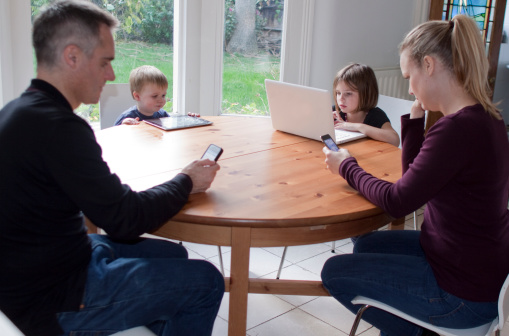
Useful family habits include:
- Device-free meals so conversation has a regular place.
- Charging phones outside bedrooms to protect sleep and reduce late-night messaging.
- A wind-down period before bed with screens off or limited to calm, agreed activities.
- Shared screen time such as family films, games or creative projects, so technology is not always solitary.
- Planned offline anchors including sport, reading, chores, outdoor time, music, cooking or seeing friends in person.
It can also help to use “when-then” language. For example: “When homework and your room are done, then gaming can start.” This sounds less like a threat and more like a predictable routine.
Keep screen-time discussions calm
Arguments often begin when screen-time rules appear suddenly, especially when a child is deeply involved in a game, chat or video. Give warnings before transitions: “You have ten minutes left,” followed by “This is your last round,” or “Pause at the end of this episode.” Children are more likely to cooperate when stopping does not feel abrupt or humiliating.
Agree rules at neutral times, not in the middle of conflict. A short weekend conversation about weekday limits will go better than a shouted debate at bedtime. Ask for your child’s input, but be clear that input is not the same as having the final decision.
Try to keep consequences related and proportionate. If a child uses a device after lights-out, moving the charger downstairs for a week is more constructive than banning every screen indefinitely. If they download an app without permission, reviewing app store settings together teaches more than a long lecture.
Language matters too. Replace “You are addicted to that thing” with “I have noticed it is hard to stop, so we need a better plan.” Replace “You never listen” with “The rule was agreed, and we need to follow it.” Calm wording does not remove the boundary; it makes the boundary easier to hear.
A practical takeaway for parents
Digital parenting is protecting children online without turning screen-time discussions into arguments by combining clear rules, regular conversations and gradual independence. The aim is not to create a perfect household where nobody ever disagrees about devices. The aim is to build a family culture where children know what is expected, understand why it matters and feel safe asking for help.
Start small if everything currently feels tense. Choose one boundary to clarify, one privacy setting to check, and one healthier habit to introduce this week. Consistency will do more than a dramatic overhaul, and calm repetition will teach more than constant conflict.
