


Have you ever scrolled past a photo of the perfect desk setup and wondered where to buy it? Or felt that nagging suspicion that a potential connection’s profile picture might not be authentic? In a world where images are everywhere, these moments can feel disempowering. But what if you had a tool to find the answers? With a simple reverse image search, you can trace almost any image back to its origin, giving you the power to verify information and build your digital confidence.
This guide is your supportive mentor, designed to help you master this essential skill. We’re breaking it down, step-by-step, so you can learn how to protect your own photos from misuse, find the original source for a project, and finally identify that product you’ve been searching for. It’s time to transform curiosity into knowledge and build a toolkit that empowers you to navigate the online world safely and successfully. Let’s get started.
Key Takeaways
- Learn how to spot fake profiles and verify information, giving you the confidence to navigate the digital world safely.
- Find the original source of any image to give proper credit in your projects or discover new artists and creators to follow.
- Master the simple steps to perform a reverse image search on any device, turning a picture into a powerful search query.
- Discover how to track where your own photos and creative work appear online, empowering you to protect your digital footprint.
What is Reverse Image Search and How Does It Work?
Ever seen a photo online and wondered where it originally came from, who’s in it, or if it’s even real? That’s where a reverse image search comes in. Think of it as searching the internet with a picture instead of words. Instead of typing a description into a search bar, you upload an image, and the search engine finds web pages, similar pictures, and information related to it. This powerful tool, as detailed in this overview of what is reverse image search, analyzes the visual data in your photo-the pixels, colors, and patterns-to find matches across the web.
Unlike a standard text search where you look for keywords, this technique looks for visual cues. It’s an essential skill for anyone looking to verify sources, find better quality images, or simply get more context about a picture you’ve stumbled upon. It empowers you to become a more savvy and confident digital citizen.
The Basic Principle: From Pixels to Results
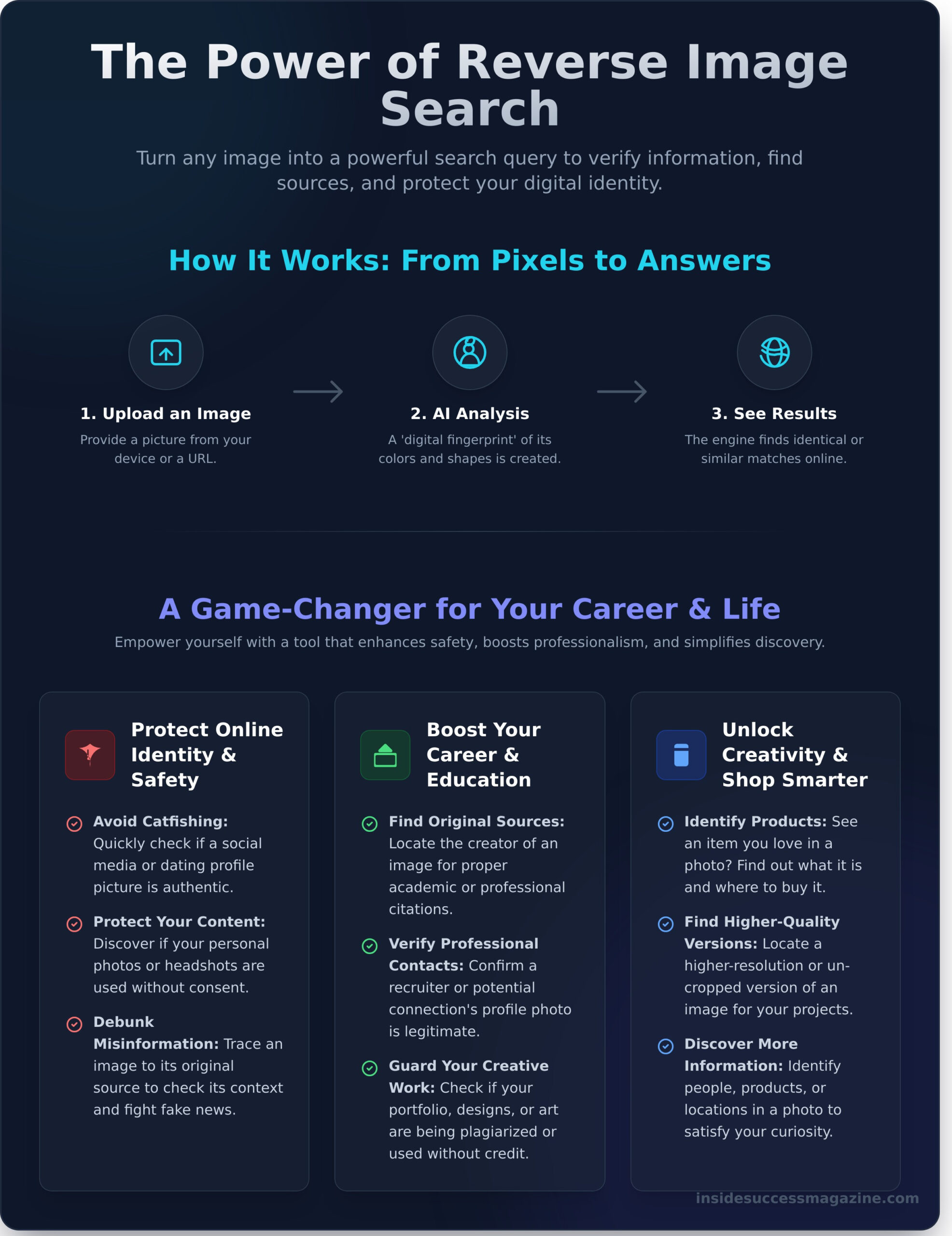
So, how does it all happen? When you upload a picture, the search engine doesn’t “see” it like a human does. Instead, it creates a unique mathematical model or a digital “fingerprint” of the image. It analyzes the distinct shapes, lines, and colors to build this signature. Then, it compares that unique fingerprint against billions of other images in its database to find ones that are identical or visually similar, delivering results in seconds.
What a Reverse Image Search Can Uncover
This simple action can unlock a huge amount of information and create new opportunities. It’s a tool that can help you protect your work, verify facts, and satisfy your curiosity. Here’s a quick look at what you can find:
- The Original Source: Track down the original creator or publisher of an image, which is crucial for giving proper credit or verifying authenticity.
- Potential Copyright Misuse: If you’re a creator, you can use a reverse image search to see if your photos or artwork are being used elsewhere online without your permission.
- Higher-Quality Versions: Find a higher-resolution or un-cropped version of a picture, perfect for presentations, projects, or just a better-looking wallpaper.
- More Information: Identify the people, products, or locations in a photo. See a pair of trainers you love? A reverse search can help you find out where to buy them.
Why It’s a Game-Changer: Practical Uses for Your Career and Life
Think of a reverse image search as more than just a tech trick-it’s a powerful skill that empowers you to navigate the digital world with greater confidence and clarity. From protecting your online identity to boosting your professional brand, this tool has practical applications that can genuinely transform how you interact with the internet. Here’s how you can use it to your advantage.
Protecting Your Online Identity and Safety
In today’s digital landscape, being proactive about your safety is non-negotiable. This tool gives you the ability to verify information and protect your personal brand. You can:
- Avoid catfishing: Quickly check if a social media or dating profile picture is authentic or if it’s been stolen from someone else’s account.
- Protect your content: Discover if your personal photos or professional headshots are being used elsewhere online without your consent.
- Debunk misinformation: In an era of fake news, you can trace an image back to its original source to see if it’s being used out of context. The Google News Initiative provides excellent guidance on verifying photos with reverse image search, helping you become a more discerning digital citizen.
Boosting Your Career and Education
Beyond safety, this skill is a secret weapon for your professional and academic growth. It helps you maintain integrity in your work and build connections with confidence. Use it to:
- Find original sources: For students and researchers, it’s an essential tool for locating the original creator of an image for proper academic citations.
- Verify professional contacts: Before a networking event or interview, you can confirm that a recruiter’s LinkedIn profile photo is legitimate.
- Guard your creative work: If you’re a designer, photographer, or artist, you can regularly check if your portfolio pieces have been plagiarized or used without credit.
Want more career-boosting skills? Explore our webinars and articles.
Unlocking Your Creativity and Shopping Smarter
This tool also has a creative and practical side that can simplify your life and spark inspiration. It’s your go-to for finding exactly what you’re looking for, whether it’s a product or a new idea. You can easily:
- Identify products from a photo: See a piece of clothing, furniture, or home decor you love? A quick search can lead you right to the retailer.
- Discover artists and creators: Find the name of a designer or artist whose work you admire but don’t know how to find.
- Plan your next adventure: Uncover the name of a stunning travel location from an inspiring picture you saw on social media.
How to Do a Reverse Image Search: A Step-by-Step Guide
Ready to unlock the story behind an image? A reverse image search is a powerful skill that puts a wealth of information at your fingertips. The technology behind it is fascinating-for a deep dive, Wikipedia offers a comprehensive overview of reverse image search-but actually performing one is incredibly straightforward. Here’s your simple, no-fuss guide to doing it on any device.
On a Desktop or Laptop (Google Images & Bing)
Using your computer is often the easiest way to get detailed results. Both Google and Bing have powerful visual search tools built right in. Here’s the four-step process:
- Step 1: Head over to Google Images or Bing Visual Search.
- Step 2: Look for the camera icon in the search bar. This is your gateway to searching by image.
- Step 3: You’ll get two options: either drag and drop an image file from your computer or paste the URL of an image you found online.
- Step 4: Hit search and explore your results! The engine will show you where the image appears online, find visually similar pictures, and even identify objects within the photo.
On Your Mobile Phone (iOS & Android)
You don’t need to be at a desk to trace an image’s origins. Your smartphone is a powerful tool for this, especially with Google’s integrated features. Here are the quickest methods:
- In the Google Chrome App: Find an image on any webpage. Simply press and hold it until a menu pops up, then select ‘Search Image with Google Lens’.
- In the Google Photos App: Open any photo you’ve saved. Tap the ‘Lens’ icon at the bottom of the screen to instantly analyze it and find related information online.
Using a Screenshot or Photo from Your Gallery
What if the image is in an app like Instagram or you just have it saved to your phone? No problem. You can take a screenshot and use that file. Then, open your mobile browser, navigate to Google Images, and tap the camera icon. You’ll see an option to ‘Upload a file,’ allowing you to select the screenshot or any photo directly from your phone’s gallery. This simple workaround empowers you to run a reverse image search on virtually anything you can see on your screen.
The Best Reverse Image Search Engines and Tools to Use
While Google is often the first stop for a quick search, it’s far from your only option. Think of it like a toolkit: you wouldn’t use a hammer for every job. The same goes for a reverse image search. Different tools are built for different tasks, and knowing which one to use can empower you to find exactly what you’re looking for, whether it’s the source of a meme or a stolen piece of your artwork.
Here’s a breakdown of the best platforms to add to your digital skill set, categorized by what they do best.
The All-Rounders: Google and Bing
For most day-to-day searches, the giants have you covered. They are your reliable, go-to options for general-purpose queries.
- Google Images: With the largest indexed database on the planet, Google is unmatched for general discovery. If you want to identify a plant, a landmark from a holiday photo, or find visually similar images, this is your best starting point.
- Bing Visual Search: Microsoft’s offering is a surprisingly powerful competitor, especially for shopping. Its ability to identify products within an image-from trainers to furniture-and link you directly to retailers is a game-changer for finding that item you saw online.
Specialized Tools for Specific Needs
When your search has a specific goal, a specialized tool delivers more precise results. These platforms are built to dig deeper and give you more targeted information.
- TinEye: This is the historian of image search engines. Instead of just finding similar-looking pictures, TinEye is brilliant for tracking an image’s journey across the web. It shows you where and when an image has appeared, making it an incredible tool for verifying sources or finding the original creator.
- Yandex: A powerful search engine that often uncovers results Google and Bing miss, particularly for images originating from Eastern Europe. If your initial search comes up empty, Yandex is an excellent second opinion.
- Social Catfish: A paid service designed to help you verify online identities. It cross-references an image against social media profiles, public records, and more, offering a deep dive to help you stay safe online.
Tools for Protecting Your Face and Art
For creators and anyone conscious of their digital footprint, these tools offer a way to take control. They transform the reverse image search from a discovery tool into a protective shield.
- PimEyes: A facial recognition search engine that lets you see where photos of your face appear online. While powerful, it raises important privacy questions, so it’s a tool to be used with awareness and caution.
- Berify & Pixsy: Essential for photographers, artists, and designers. These platforms are built to find unauthorized uses of your creative work. They help you track down stolen content, giving you the power to protect your intellectual property and your hustle.
Advanced Tips and Protecting Your Digital Footprint
You’ve mastered the basics of the reverse image search, and that’s a powerful skill. Now, let’s empower you to go a step further. Knowing how to find images is one thing; knowing how to protect your own creative work and handle digital theft with confidence is how you truly take control of your online presence. Think of this as your guide to becoming a more resilient and savvy digital creator.
What to Do When You Find Stolen Content
Discovering your photo or design used without permission can feel disheartening, but don’t panic. You have clear, actionable steps you can take to reclaim your work. The key is to stay professional and methodical.
- Document the Infringement: Before you do anything else, take dated screenshots of the webpage where your content is being used. This is crucial evidence if you need to escalate the situation.
- Request Removal or Credit Politely: Often, image theft is unintentional. Draft a simple, polite email to the site owner explaining that you are the copyright holder and that the image is being used without permission. You can either request that they credit you with a link back to your site or remove the image entirely.
- Consider a DMCA Takedown: If your polite request is ignored, your next step is a formal DMCA (Digital Millennium Copyright Act) takedown notice. This is a legal request sent to the website’s hosting service, which is legally obligated to remove the infringing content.
Making Your Own Images Harder to Find
The best strategy is a proactive one. By making your images a less attractive target for theft, you can prevent many issues before they even start. Here are a few expert techniques:
Watermark your photos. A visible watermark with your name or logo is a strong deterrent. The downside is that it can sometimes detract from the image itself. A good compromise is a subtle, semi-transparent watermark placed near the edge of the photo.
Disable image indexing. If you host images on your own website or portfolio, you can add a “noimageindex” meta tag to your site’s code. This is a simple instruction that tells search engines like Google not to include your images in their visual search results, making them much harder to discover and misuse.
Upload lower-resolution images. When sharing your work on social media, upload versions that are optimized for the web but not for print. A high-quality image might be stolen for commercial use, but a lower-resolution one is far less valuable to thieves.
Mastering tools like the reverse image search is about building the confidence to navigate the digital world on your own terms. Protecting your creative output is a vital part of your professional journey, and we’re here to support you every step of the way. For more guides on building your skills, explore the resources at insidesuccessmagazine.com.
Empower Your Digital Skills: Beyond the Image
You now have the power to trace an image back to its origin, a skill that’s more crucial than ever in our digital world. From verifying the authenticity of a news photo to protecting your own creative work, you’ve seen how mastering a reverse image search gives you greater control and confidence. This isn’t just a technical trick; it’s a fundamental part of digital literacy that empowers you in your career and online life.
Building skills like this is what sets you up for success. As a trusted resource for career development and online safety, InsideSuccessMagazine is committed to empowering young people with the tools they need to thrive. Our actionable guides are written for an ambitious generation ready to build a confident future.
Your journey to digital mastery has just begun. Keep building, keep learning, and know that you have the power to shape your success.
Frequently Asked Questions About Reverse Image Search
Is it free to do a reverse image search?
Absolutely! Most of the powerful tools you’ll need, like Google Images and TinEye, are completely free to use. This makes it an incredibly accessible skill for verifying information, finding the source of a photo, or satisfying your curiosity without any financial barrier. It’s a great example of how you can leverage powerful technology to empower yourself with knowledge, completely free of charge. You have the opportunity to build your digital literacy right at your fingertips.
Can I do a reverse image search for a person?
Yes, you can. This can be a useful tool for verifying a professional contact’s identity on LinkedIn or finding other public profiles associated with a headshot. However, it’s crucial to approach this with respect for privacy. While specialized tools like PimEyes exist, always consider the ethical implications. Using this skill responsibly is key to building trust and maintaining your integrity, both online and offline. Think of it as a tool for safety and verification, not intrusion.
Is it legal to use reverse image search?
Using a reverse image search tool itself is perfectly legal-it’s just a method of searching the public web. The important part is how you use the images you find. If an image is protected by copyright, you can’t just use it for your own project or business without permission. Think of the search as a research tool to find the original creator so you can properly credit them or request permission. It’s a great way to practice professional digital etiquette.
What should I do if my reverse image search finds no results?
Don’t feel discouraged! No results simply means the image may not be widely indexed online yet. First, try a different search engine, as each has its own database. You can also try cropping the image to focus on a specific object or person, which can sometimes yield better results. If the image is very new, it might just take time to appear. This is a great opportunity to practice resilience and creative problem-solving in your digital investigations.
How accurate are reverse image search results?
The accuracy is impressive, especially for finding exact copies of an image. If you’re looking for the original source of a specific photo, a reverse image search is highly reliable. Where it can be less precise is in finding “visually similar” images. The algorithm might show you pictures with similar colors or shapes that aren’t actually related. Always use your critical thinking skills to evaluate the results and determine which ones are truly relevant to your search.
Does reverse image search work on videos?
While you can’t upload a whole video file, you can absolutely use this technique on videos with a smart workaround. The key is to take a clear screenshot of a specific frame from the video-ideally one with a distinct subject or background. You can then upload that screenshot just like any other image. This is a powerful method for identifying the source of a viral clip, a movie scene, or a news report, giving you more control over the media you consume.

I am a creative professional specializing in Web Development, WordPress Development, and Product (UI/UX) Design. I design and build responsive, high-performance websites and intuitive digital products that merge sleek aesthetics with seamless user experiences. I blend code and creativity to help brands grow, engage users, and stand out in the digital space. Beyond building, I also mentor individuals looking to learn and I actively collaborate with fellow developers and designers to bring bold ideas to life.

Leave a Reply
You must be logged in to post a comment.